Photos and scans get taken on job sites all the time. A lot of them end up stored away or only looked at briefly. Track3D uses those same files to show what’s been installed and where the job stands, so they’re useful while work is still underway.
What is Track3D?
Track3D is designed to move construction data from storage to active use. Instead of acting as a passive system of record, the platform applies intelligence to everyday job site captures so teams can understand what has actually been built and where.
Many contractors already collect large amounts of visual data, but it often goes unused. “There’s so much data that a job site is generating, but none of it is actually being used,” says Chaitanya NK, Track3D co-founder and CEO.
Track3D takes job site photos and scans and puts them in context. Rather than storing them as records, the platform links what’s captured in the field to drawings and quantities so teams can see real progress. “The missing piece of the puzzle was the intelligence,” NK explains. “How do we make this data extremely useful to drive the project of today and also serve as an intelligence layer for future projects?”
To make adoption practical at scale, Track3D was built around four core principles. “For it to be adopted at scale, it had to be simple, fast, accurate enough to trust, and cost-effective,” NK says. That approach makes it easier to use across different kinds of jobs, without having to ask crews to change how they already work.
What Track3D does on a job site
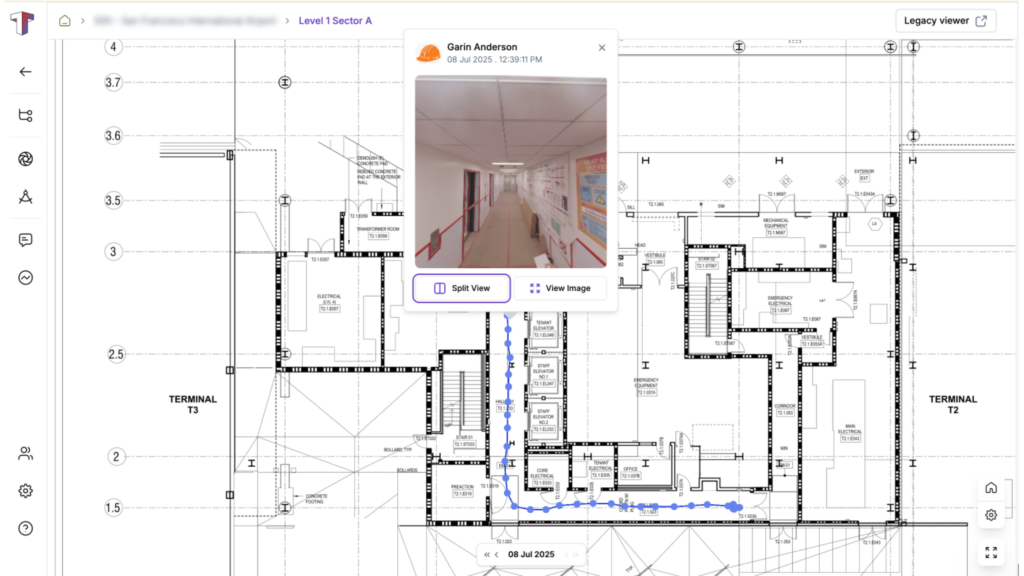
On a day-to-day job site, Track3D integrates with the tools crews already use to capture field conditions. The platform ingests visual data from 360-degree cameras, drones, LiDAR and laser scanners, and mobile phones, consolidating those inputs into a single system rather than leaving them scattered across devices.
That data is then translated into floor-plan-based views that show what has been installed and where. Instead of flipping through images or spreadsheets, teams can see progress directly on drawings.
Track3D pairs those visuals with measurable, verifiable quantities, removing guesswork from progress reporting. “When the system says that, for example, 80% of the ductwork is completed, it will also tell you that 560 linear feet of ductwork is actually complete,” NK says. “That’s the level of precision you are getting; it also shows you exactly where it has been completed.” Teams can see what work has been done and confirm it without relying on estimates.
Turning subjective updates into objective progress
Progress reporting has traditionally been subjective. “If you ask three different people how much work is done, you’ll find very subjective answers,” NK says. “It’s just inefficient.”
Track3D replaces guesswork with a direct view of what’s been installed. It cuts down on manual measuring and reporting by tying progress back to what’s visible on site.
Because progress is based on measurable data, Track3D creates a shared source of truth for owners, general contractors, and trade partners. “Now you have taken out that subjectivity and made it objective data that no one can question,” NK says.
Speed to value, without heavy setup
One of Track3D’s biggest advantages is how quickly teams can start seeing results. While many construction tracking tools require weeks or months of setup, Track3D is designed to be live within 24 hours. With project drawings and an initial capture, teams can begin reviewing progress almost immediately.
There is no need for complex BIM coordination or detailed schedule configuration before the platform becomes useful. That makes it possible to introduce Track3D mid-project, even when timelines are already tight.
The speed matters most on mission-critical projects. NK cites one project for an airport where Track 3D was enlisted 6 months into the project. “One competitor would have taken about three months just to onboard the project. We were showing results within 24 hours,” says NK. “If you remove three months of setup time, that’s a huge cost saving. That’s why we focus so heavily on time to value.”
Where Track3D fits in the construction tech stack
Track3D isn’t meant to replace the software teams already use. Existing tools like Procore and Autodesk Construction Cloud are still used for scheduling, coordination, and documentation. Track3D comes into play when teams need to know what work is actually done on-site.
By focusing on progress itself, Track3D lets teams check work in place without rebuilding the same information across multiple systems. Progress data stays consistent, so everyone is working from the same picture.
Agentic AI and what comes next
Track3D’s next phase focuses on using agentic AI to transform unstructured job site inputs into actionable insights. Many construction workflows still rely on whiteboards, handwritten notes, and informal updates that are difficult to track digitally.
“Construction produces tons of data, but most of it is very unorganized and unstructured,” NK says. “So most of it isn’t even usable.”
A typical example is the whiteboard in a job trailer used for sequencing. “People put Post-it notes on that just to draw out the construction sequencing,” NK explains. “With agentic AI, you can take a picture of that and convert it into text and meaningful insights.”
The goal is to give teams more natural, conversational access to progress information, moving from reactive reporting to proactive insights that surface issues earlier.
Who is using Track3D today?
Track3D is currently used by approximately 35 large, multi-project customers, many of which manage entire portfolios rather than single jobs. Several of these customers are among the ENR Top 100 contractors. Today, Track3D is used on projects such as data centers, airports, hospitals, and large commercial and infrastructure jobs.
Funding and growth
In 2025, Track3D raised $10 million in Series A funding led by Ironspring Ventures, with participation from Zacua Ventures and existing investors. The funding is being used to expand the company’s team and to continue developing its progress-tracking and AI capabilities as adoption grows across U.S. construction projects. “We started by going after the top 30 general contractors because they’ve tried every competing product in the market,” says NK. “Our proof point wasn’t a one-off project, but whether they could scale Track3D across an entire portfolio.”
Measuring customer success
For Track3D customers, success comes down to whether projects stay on track. One of the clearest signs is time saved on the schedule, either by avoiding delays or catching issues earlier, while there’s still room to adjust.
Another major benefit is reduced rework. “By catching mistakes early, the cost associated with the rework is drastically reduced,” NK says.
Track3D cuts down on the time teams spend measuring and putting reports together. For owners, it makes it easier to keep an eye on multiple projects without being on site all the time. The same records can still be used later, when the building is handed over and needs to be operated or maintained. “Post-construction, you know where the pipes are, where the backings are, everything,” NK says.
Pricing and scalability
Track3D charges based on square footage over the course of a year. Teams can use it on one job or spread it across several projects, without switching plans or tools. The setup works the same way whether the job is small or large.
Why Track3D matters right now
Construction teams are facing labor shortages, rising costs, and increasing pressure to deliver projects on tighter schedules; teams don’t have much room for error. Disagreements over progress and rework still cost time and money, especially when everyone is working from different assumptions. By showing what’s actually been built, Track3D helps teams focus on fixing problems instead of arguing about how far along the job really is.
Track3D reduces friction among stakeholders and shifts conversations from debating percentages to solving real problems. At a time when clarity matters more than ever, that shift is significant.
The long-term vision
Looking ahead, Track3D sees reality intelligence as the foundation for something bigger. “We believe Track3D has the potential to become the operating system of any physical asset,” NK says.
That vision extends beyond construction progress to support asset tracking, planning, operations, and maintenance across the full lifecycle of buildings and infrastructure.
Final thoughts
Track3D gives construction teams a clearer way to understand what’s happening on site, using information they’re already capturing. By keeping things simple and fast, it helps teams make decisions based on what’s actually in place, not assumptions.
To learn more, visit https://track3d.ai/ and follow Track3D on LinkedIn.
For more construction technology spotlights and industry insights, subscribe to our newsletter.