
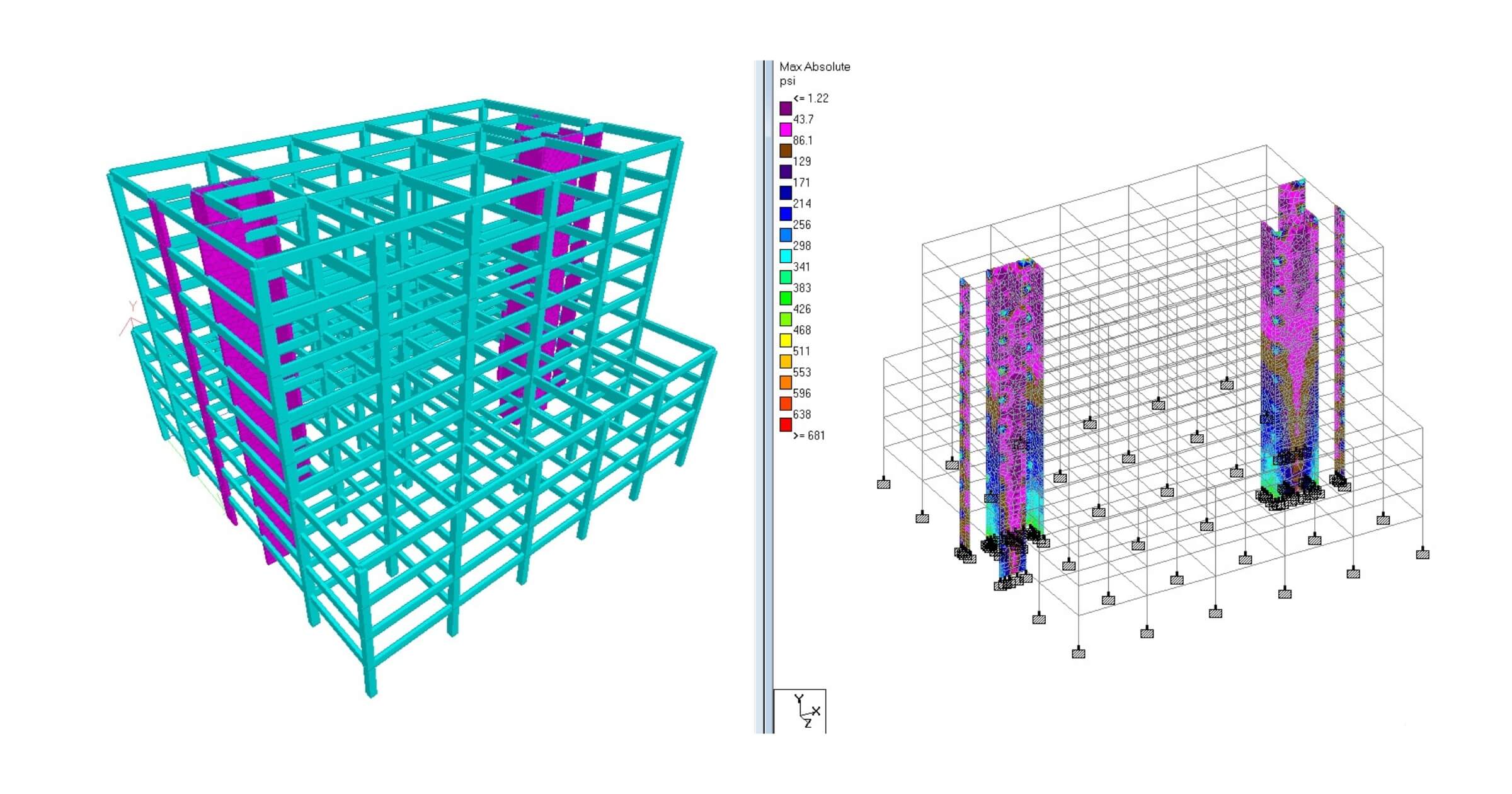
Structural analysis software has become a core tool on the desks of structural engineers in both design offices and field coordination roles. These platforms handle everything from load combinations and concrete reinforcement checks to connection detailing and 3D visualization. Whether you’re working in BIM-heavy environments or running standalone calculations for submittals, the right structural design and analysis software can streamline tasks, speed up decision-making, and reduce back-and-forth with review teams. In this guide, we look at the top structural engineering software widely used in AEC workflows, including Tekla Structural Designer, STAAD.Pro, and Robot Structural Analysis.
The 10 best structural analysis software tools for engineers
1. Tekla Structural Designer
| Pros | Cons |
| – Automated wind, seismic, and gravity loading tools – Native BIM coordination with Tekla Structures and Revit – Real-time analysis feedback as the model is edited – Accurate steel connection design tools that align with detailing workflows – Widely used by design-build contractors for fast turnaround | – Licenses are expensive for small firms – Best performance is tied to a full Tekla workflow, making it less flexible for standalone users |
Key features
- Real-time analysis updates as models are modified, reducing iteration time
- Automated wind, seismic, and gravity load generation
- Integrated steel connection and concrete frame design with code checks
- Direct BIM interoperability with Tekla Structures and Revit
- Supports both detailed design and early-stage conceptual modeling
Tekla Structural Designer is known for integrating modeling, analysis, and detailing into a single environment. Engineers mention that the best part of using Tekla is seeing analysis results update as model elements are modified, which reduces the typical loop of exporting to another solver. Built-in code checks enable teams to efficiently navigate steel and concrete framing without switching between multiple tools.
The trade-off is that Tekla shines most when paired with Tekla Structures. Firms not already invested in that ecosystem may find the onboarding heavy, especially if they mainly deliver calculation sets instead of coordinated BIM models. Tekla Structural Designer is often chosen by firms that want 3D structural analysis software tightly integrated with BIM workflows.
2. STAAD.Pro
| Pros | Cons |
| – Handles a wide range of structure types, including towers, plants, and bridges – Deep library of international building codes – Good for engineers working across multiple regions or exporting stamped designs – Custom load combinations with detailed control – Large support community and learning resources | – User interface feels dated to engineers who prefer visual modeling tools – Modeling complex geometry takes longer than with Tekla or SCIA |
Key features
- Extensive library of international building codes for global projects
- Flexible definition of load combinations and staged construction
- Supports multiple structural types, including towers, bridges, and industrial facilities
- Transparent calculation reports for steel, concrete, and composite designs
- Advanced finite element solver for beams, shells, and solids
STAAD.Pro is often described as a legacy structural analysis and design software—but in a positive way. It’s used by many senior engineers who trust its solver and building code database. Forum discussions highlight that STAAD is reliable for sizing steel and concrete elements, applicable to a wide range of structures, and it is very user-friendly. Engineers also appreciate how transparent STAAD is with calculation breakdowns.
Its modeling interface isn’t as graphical or intuitive as others, which can slow down users transitioning from Revit or Tekla. STAAD.Pro is best suited for engineers who require code flexibility and precise control over analysis logic, and who are comfortable manually setting up geometry or load cases.
3. Robot Structural Analysis
| Pros | Cons |
| – Mesh control tools with advanced FEA capabilities – Integrates directly with Revit for BIM-heavy workflows – Good for complex geometry and multi-material models – Visualization tools for deformation and stress distribution – Familiar interface for teams already using Autodesk software | – Solver performance slows significantly on high-mesh models – North American engineers report better code implementation in Tekla and ETABS |
Key features
- Advanced FEA mesh control for shells, slabs, and complex geometries
- Direct integration with Revit for BIM-based workflows
- Detailed stress and deformation visualization with customizable plots
- Multi-material support, including concrete, steel, and timber
- Parametric modeling capabilities for rapid iteration on structural changes
Robot Structural Analysis, commonly referred to as Autodesk Robot, is favored by engineers who rely on BIM coordination. Users in Autodesk communities say that Robot feels like a natural extension of Revit, especially when updating structural elements and pushing revisions back into the BIM file. It offers granular finite element analysis tools with customizable mesh refinement, which is valuable for concrete slabs, shells, and curved structural forms.
Robot struggles with very large models, prompting some firms to switch back to Tekla or SCIA for complex steelwork. Still, for Revit-based teams that need more than Revit’s analytical model can handle, Robot is a logical step up. It’s best for engineers who want to stay within Autodesk and need strong FEA capabilities without leaving the ecosystem.
4. ETABS
| Pros | Cons |
| – Strong for concrete and steel frame analysis – Visual 3D modeling interface that’s easier to navigate than most – Library of international building codes – Efficient for multi-story structural design projects – Good community support among commercial engineering firms | – Heavier system requirements than STAAD.Pro – Can feel restrictive for custom geometry |
Key features
- Optimized for multi-story building analysis, particularly steel and concrete frames
- Visual 3D modeling with intuitive editing and automatic load application
- Library of international building codes with automated checks
- Efficient handling of repetitive floor systems and diaphragm loads
- Advanced dynamic analysis tools for seismic and wind effects
ETABS is widely trusted in commercial building design for its handling of repetitive floor systems and gravity/load combinations. Engineers often mention on industry forums that ETABS “feels made for towers,” with automated load application tools that cut down setup time. Its building code integration enables engineers to quickly iterate through multiple design scenarios without manually re-entering parameters. The visual feedback makes it easier to catch misaligned frames and drifting columns in early modeling stages.
That said, ETABS isn’t ideal for bridge work or highly irregular architecture. Parametric editing is available, but users have noted that it feels limited compared to Rhino or Tekla when pushing more experimental structures. Best suited for firms doing high-volume mid-to-high-rise concrete or composite structure design where deadlines are tight and code compliance needs to be baked in from the start.
5. SAP2000
| Pros | Cons |
| – Versatile for a broad mix of civil and structural projects – Strong bridge and infrastructure tools – Handles dynamic loading scenarios for complex environments – Highly customizable load combinations – Compatible with a wide range of CAD formats | – Interface feels outdated to new engineers – Requires experience to fully leverage its advanced features |
Key features
- Versatile solver suitable for buildings, bridges, and infrastructure projects
- Dynamic and time-history analysis for seismic, wind, and moving loads
- Highly customizable load combinations and staged construction simulation
- Post-processing visualization of stress, deflection, and member forces
- Supports a wide range of import/export formats for CAD and BIM interoperability
SAP2000 is often described as a workhorse software used in transportation engineering departments and large civil contractors. SAP2000 is appreciated for its versatility in modeling various structural elements. A user noted, “SAP is fairly versatile with respect to structural-centric FEA software. It has a fairly straightforward interface and enough advanced analysis options that it covers a wide array of situations a designer would come across.”
The downside is that the UI hasn’t adapted to new generation modeling habits. New engineers used to Revit or Tekla find it clunky at first. Still, for complex infrastructure where construction sequence affects stress distribution, SAP2000 keeps showing up in professional portfolios for a reason.
6. Genia Structural AI Agent
| Pros | Cons |
| – AI-driven structural layout generation from architectural drawings – Fast iteration: produces multiple structural scheme options in minutes – Exportable, code-validated calculation sheets and structural drawings – BIM/CAD interoperability with editing, refining, and revision cycles | – Relatively new product—fewer large-scale case studies available – Less control for highly customized or irregular structural systems – Dependence on quality of input architectural model or drawings |
Key features
- Automatic parsing of architectural drawings (CAD/BIM) to identify walls, openings, and geometry elements
- Generation of dozens of structural layout options validated with physics-based methods and relevant codes
- Editing interface that allows users to tweak parameters, refine geometry, and re-run analysis
- Export function for permit-ready structural drawings, material takeoffs, and detailed calculation reports
- Integration with ASCE API for environmental load factors and structural load assignment
Genia offers a fresh take on structural design software by pushing AI into the early design stage. Instead of starting from scratch, Genia allows structural engineers to upload architectural plans; the tool then proposes structure options with automated load paths, beam layouts, and reinforcement or steel member sizing. It’s especially useful when you want to quickly explore multiple design schemes, validate them structurally, and hand off drawings with minimal rework.
That said, Genia’s value may be more limited when working with unconventional geometry, bespoke architectural forms, or highly optimized large projects. In those cases, engineers accustomed to complete control or custom scripting might find it restrictive. Genia is best suited for consulting firms, small-to-mid structural offices, or early-stage design teams that want to accelerate scheme validation, reduce manual drafting, and optimize material use.
7. PhysicsX
| Pros | Cons |
| – AI-driven structural optimization that reduces manual iteration time – Capable of running thousands of load case permutations through machine learning simulation – Integrates with existing FEA workflows rather than replacing them – Built around speed—decisions can be iterated in minutes instead of hours | – Requires high-performance computing infrastructure or cloud credits – Not a traditional design package—better suited as an advanced companion tool rather than a standalone solver – Best results require users to understand how to set up optimization constraints effectively |
Key features
- AI-driven co-pilot that runs rapid structural performance checks before formal FEA
- Generates and evaluates high volumes of micro-variations in geometry and loading without manual setup
- Acts as a pre-analysis filter to highlight stress hot spots and material inefficiencies before models are pushed into Tekla, ETABS, MIDAS, or similar software
- Used by engineering teams in aerospace, automotive, and high-tech construction to shorten adjustment and optimization cycles
- Best for firms wanting to integrate AI-supported simulation with conventional structural analysis to speed up early decision-making
PhysicsX positions itself not as a conventional FEA program but as an AI co-pilot for structural engineers, trained to accelerate performance checks, optimization tasks, and predictive load simulations. Engineering teams in aerospace, automotive, and emerging high-tech construction sectors use it to evaluate thousands of micro-adjustments to structural elements that would be impractical to make manually. It can help reduce material use and flag stress concentrations before engineering review, acting as a pre-analysis layer before formal calculation packages are run in tools like Tekla, ETABS, or MIDAS.
PhysicsX doesn’t replace engineering judgment or validation tools. Instead, it augments existing workflows by acting as a rapid iteration engine that shortens the time between early concept and verified structural scheme. Best suited for firms interested in pairing AI simulation with FEA to compress design timelines or explore alternate structural strategies early in a project lifecycle.
8. Sofistik
| Pros | Cons |
| – Advanced finite element modeling and bridge design tools – Built-in CFD and fluid-structure interaction support – Parametric modeling with Grasshopper integration – Excellent for prestressed concrete workflows – Used in high-profile infrastructure projects | – Requires strong FEA knowledge – Interface learning curve is steep |
Key features
- Advanced finite element modeling, including prestressed concrete and bridges
- Parametric modeling via Grasshopper and Rhino integration
- Fluid-structure and multiphysics simulation for complex structures
- Detailed staged construction and post-tensioning control
- Specialized modules for tunnels, long-span bridges, and slabs
Sofistik is regarded as high-tier engineering software, often used in complex infrastructure like long-span bridges, post-tensioned slabs, and tunnels. It has unmatched control over prestress stages, which matters for contractors and designers working in specialized markets. The Grasshopper integration makes it appealing to parametric geometry experts accustomed to Rhino workflows.
But this isn’t generalist software. New engineers report hitting a wall unless they’re already familiar with advanced finite element method concepts. Best suited for engineering firms working on signature structures or public infrastructure projects where advanced simulation is expected.
9. RFEM by Dlubal Software
| Pros | Cons |
| – Highly intuitive interface with drag-and-drop modeling – Strong nonlinear and dynamic analysis capabilities – Excellent documentation and calculation transparency – Extensive library of add-on modules for specialized workflows (timber, glass, tensile structures, etc.) – Good IFC and BIM data exchange support | – Licensing cost increases quickly once multiple add-on modules are included – North American engineers report that U.S. code workflows feel like secondary additions compared to Eurocode |
Key features
- Modular add-on structure for specialized workflows like timber, glass, and tensile structures
- Nonlinear, dynamic, and time-dependent analysis capabilities
- Clear documentation with calculation transparency and code-check reports
- Drag-and-drop interface for quick modeling of complex geometry
- IFC and BIM integration for architectural and structural collaboration
RFEM is often described by engineers as a “modular toolkit” rather than a single monolithic program. It’s especially valued in firms doing structurally expressive architecture—glass facades, tensile membranes, curved roof shells, and hybrid timber-steel assemblies. Users on engineering forums say RFEM strikes a balance between advanced FEA control and usability, as it is easy to learn and allows younger engineers to get productive without weeks of training.
Its biggest strength is how it structures component add-ons. For example, a team focused only on steel halls and light structures can license just those elements without paying for bridge or CFD capabilities. RFEM is widely considered one of the most flexible 3D structural analysis software platforms for engineers who need deeper FEA control without getting stuck in a scripting-heavy environment.
10. MIDAS Gen (and MIDAS Civil for infrastructure)
| Pros | Cons |
| – Strong in steel and concrete structural design for mid-to-high-rise buildings – Widely used in Asia and by global firms working on international tenders – Built-in staged construction analysis for both buildings and bridges – Automatic load generation for wind, seismic, and moving vehicle loads (MIDAS Civil) – Clean post-processing interface for reviewing stress fields and deflection envelopes | – Support materials are better in Korean and Japanese, with English resources improving but still limited – Interface feels unfamiliar to users coming from Autodesk or Tekla ecosystems |
Key features
- Built-in staged construction analysis for buildings and bridges
- Automatic generation of wind, seismic, and vehicular loads
- Dynamic analysis tools for seismic, creep, and shrinkage effects
- Detailed post-processing of stress, deflection, and force distribution
- Supports high-rise buildings, bridges, and international design codes
MIDAS Gen is a staple in engineering firms working on international high-rise, hospital, and civic building tenders, particularly in projects requiring staged construction and seismic load tracking. One user in r/StructuralEngineering shared their experience with MIDAS, “Great UI and quite friendly compared to others. Has advanced capabilities incl. non-linear, time history, seismic, etc.”.
MIDAS Civil, its sibling product, is heavily used in bridge tenders—cable-stayed, segmental, and long-span steel girders. The software’s time-dependent analysis for creep, shrinkage, and tendon tension losses is one of the reasons it appears so often in infrastructure bids. Best suited for firms submitting on international infrastructure or large reinforced concrete projects where staged loading is a deliverable, not an optional add-on.
Each of these platforms serves a different role in the ecosystem of structural analysis software, and understanding those differences is key to choosing the right one for your firm.
What to consider before choosing structural analysis software
- Match software to your typical project size – A residential/light commercial firm won’t benefit from Tekla’s full ecosystem the way a large-scale contractor might.
- Check code libraries before committing – Some tools lean Eurocode, some AISC, and switching takes time.
- Assess BIM coordination needs – If you’re working in a full Revit or Tekla environment, standalone tools without data exchange features will slow you down.
- Factor in hardware requirements – ETABS, Robot Structural Analysis, and Tekla have higher GPU requirements.
- Look at community support and training availability – RISA and STAAD.Pro have large knowledge bases that help new engineers ramp up faster.
- Review licensing models – Some platforms require full suite subscriptions to access features you might not need.
Interested in more engineering topics and emerging tools? Check out:
- The 12 latest AI 3D tools for construction projects
- How to become a civil engineer
- 3D modeling in AEC
- The top civil engineering design software for engineers
If you’re working in architecture, construction, or engineering and want more content on software and field tech that’s shaping practice, subscribe to our newsletter.