

Contractors today face more moving parts than ever, including budgets, schedules, client updates, and field reports. That’s where construction management software comes in, giving teams the tools to stay organized and keep projects on track. This article compares Procore vs Buildertrend, breaking down features, pricing, and usability so you can decide which platform is the better fit for your business.
Quick snapshot of both contractor tools and what they do
Procore is built for bigger construction teams that manage complex projects. It supports advanced integrations and detailed reports, making it easier to keep track of budgets and schedules across multiple jobs. It’s ideal for general contractors, specialty contractors, and large firms that require software that can scale with their needs.
Buildertrend is a cloud-based platform designed for small- to mid-size residential contractors. It excels in client communication, project tracking, and keeping homeowners informed. Buildertrend works best for remodelers, home builders, and contractors who want an all-in-one solution without the steep learning curve.
Feature comparison: Buildertrend vs Procore
| Feature | Procore | Buildertrend |
| Project scheduling | Advanced scheduling with Gantt charts, resource allocation, and multi-project views | Straightforward scheduling with calendars and task lists, suitable for smaller teams |
| Budgeting/cost tracking | Robust cost management tools, including forecasting, change orders, and integration with accounting systems | Solid budgeting tools focused on job costing and expense tracking, more basic than Procore |
| Document management | Centralized storage for drawings, RFIs, submittals, and change orders, with version control | Document sharing for plans, photos, and updates, with simpler versioning features |
| Mobile app access | Full-featured mobile app that mirrors most desktop functions | Intuitive mobile app geared toward quick updates and client communication |
| Integration options | Broad ecosystem with hundreds of integrations, including accounting (QuickBooks, Sage), BIM, and ERP systems | Integrates with accounting tools like QuickBooks and Xero, but has fewer third-party connections |
| Training/support | 24/7 support, dedicated onboarding, and extensive learning resources | Strong customer support with phone, chat, and onboarding, geared toward smaller contractors |
Buildertrend vs Procore: Pricing and plans
Buildertrend provides custom quotes and does not list standard monthly prices on its public pricing page. You’ll be asked a few questions, then you’ll get a tailored quote. They also run promotions, such as “Only $99/month for the first two months,” and mention a 30-day money-back guarantee; however, the guarantee only applies if stated on your order form.
Procore utilizes a quote-based model tailored to your specific needs, offering unlimited users, data storage, and 24/7 support. Procore offers free demos and short video tours, allowing you to try it out before making a decision.
Ease of use: Which contractor software is better?
Setup time and learning curve
Many small contractors say Buildertrend doesn’t take long to set up. With the built-in onboarding, most teams are comfortable using it in just a few days. Procore, while powerful, has a steeper learning curve. Larger teams may require several weeks of onboarding and training to become comfortable, especially since the platform offers more advanced features and customization options.
Dashboard and user interface
Reviews and demo videos show that Buildertrend’s dashboard is clean and straightforward, with easy navigation between scheduling, budgeting, and client communication. It’s built with smaller teams in mind, so users won’t feel overwhelmed by too many menus.
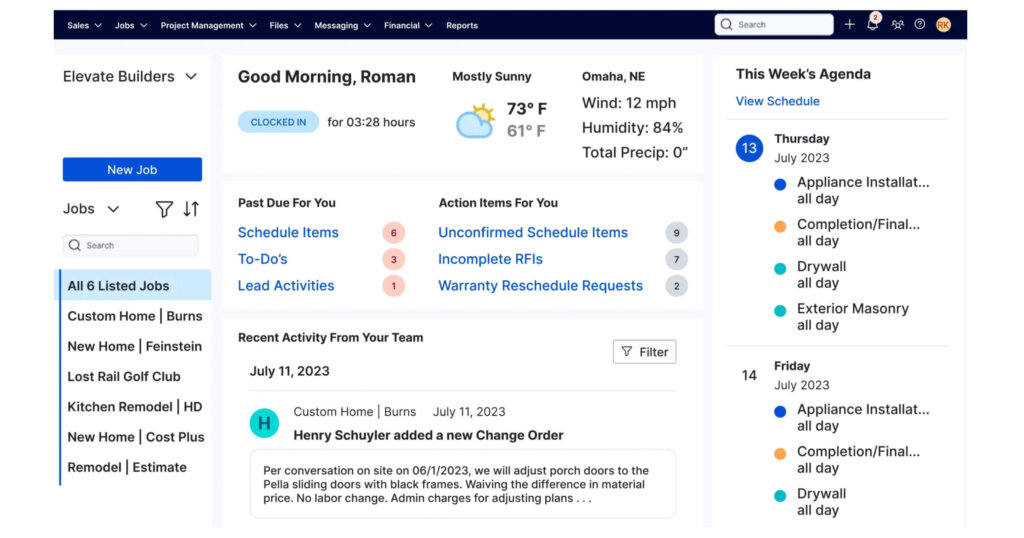
Image of Buildertrend dahsboard courtesy of https://buildertrend.com/
Procore’s dashboard offers more tools than Buildertrend, which can initially feel overwhelming. Once you get used to it, the extra detail helps you stay on top of budgets and schedules.
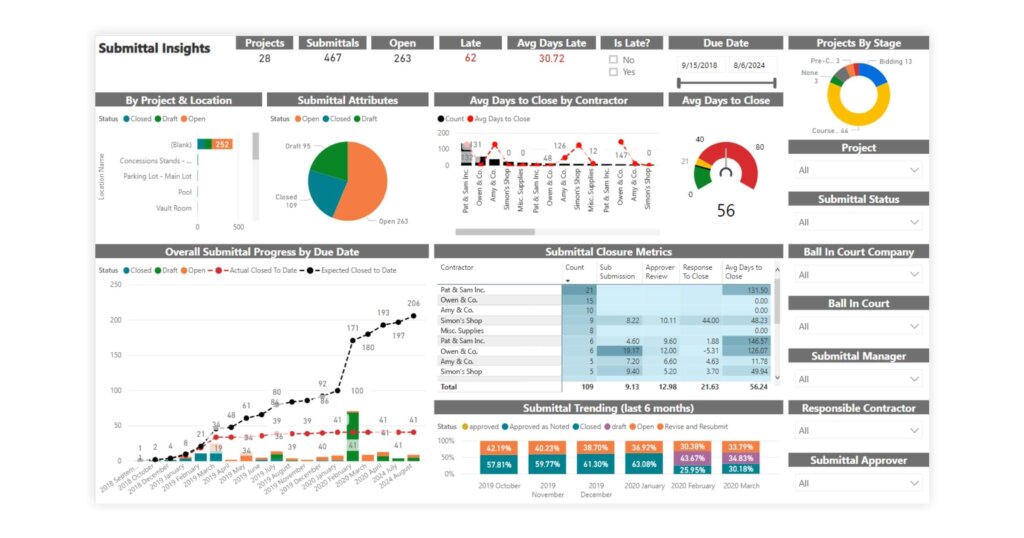
Image of Procore dashboard courtesy of https://www.procore.com/
Mobile app experience
Both platforms offer strong mobile apps, but they serve slightly different needs. Buildertrend’s app is designed to make quick updates in the field and keep clients in the loop with photos, messages, and schedule changes.

Buildertrend mobile app display courtesy of https://buildertrend.com/
Procore’s mobile app mirrors much of the desktop experience, including advanced document control and reporting, which is useful for larger teams managing multiple projects.
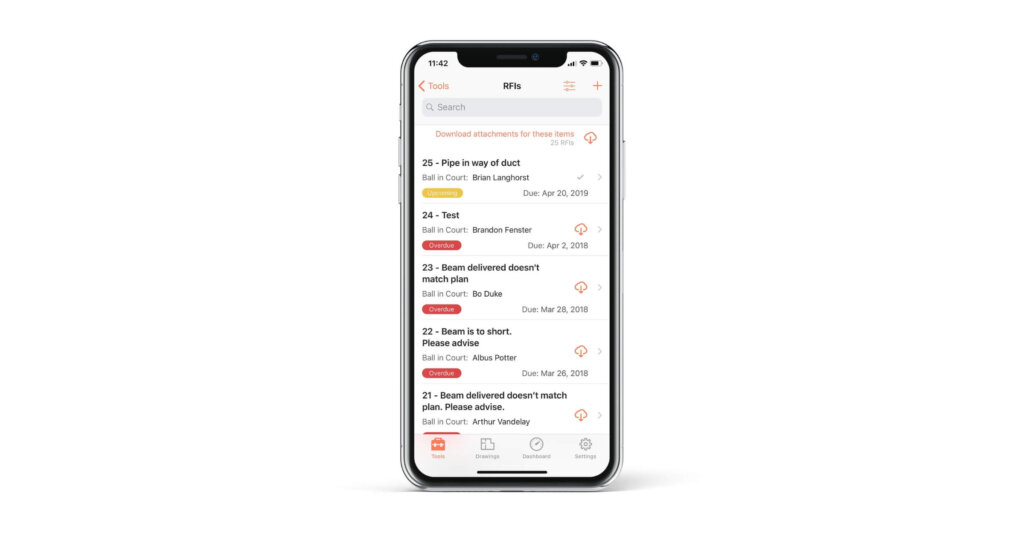
Procore mobile app display courtesy of https://www.procore.com/
Procore vs Buildertrend: Pros and cons
Procore
Pros
- Scalability for large projects: Procore is built to handle complex, multi-site operations, making it a strong fit for mid-to-large contractors.
- Broad integration ecosystem: With hundreds of third-party connections, including QuickBooks, Sage, and Autodesk tools, it easily plugs into existing workflows.
- Robust reporting tools: Procore’s dashboards enable contractors to monitor budgets, schedules, and overall project progress in one place.
Cons
- Higher pricing barrier: Procore uses a quote-based model and annual contracts, which can be costly compared to Buildertrend’s entry-level options.
- Steeper learning curve: The platform’s depth of features means onboarding and integration can take more time, especially for smaller teams without dedicated IT support.
Buildertrend
Pros
- Affordable entry-level pricing: Buildertrend’s plans start lower than Procore, making it a cost-friendly option for small to mid-size contractors.
- Strong client communication tools: Features such as homeowner portals, photo sharing, and accurate updates keep clients informed throughout a project.
- Simpler onboarding: With guided setup and a clean interface, Buildertrend is easier for new users to learn compared to enterprise-level platforms.
Cons
- Limited scalability for huge projects: While excellent for home builders and remodelers, Buildertrend may struggle to support the complexity of multi-million-dollar or multi-site builds.
- Fewer advanced integrations: Compared to Procore’s ecosystem, Buildertrend offers a smaller set of third-party integrations, which may be a drawback for contractors who rely on multiple software tools.
Final verdict: Which contractor software is right for you?
Procore and Buildertrend both bring a lot to the table, but they’re built with different contractors in mind. Procore is a heavy-duty platform designed for mid-to-large firms managing complex projects across multiple sites. It shines with advanced reporting, a wide range of integrations, and scalability. Buildertrend is a better fit for small to mid-sized contractors who want straightforward project management, strong client communication tools, and a faster onboarding process.
- Choose Procore if: you’re an enterprise or mid-to-large contractor needing advanced features, integrations, and robust reporting.
- Choose Buildertrend if: you’re a small to mid-size contractor needing simple, client-friendly project management at a more affordable price point.
If you’d like to dig deeper, check out our related coverage, including why contractors are frustrated with Procore, the Oracle vs Procore lawsuit shaking up construction tech, and tools like Build for project management or CRM software for contractors. You can also explore how field management tools help boost profits in this guide.
Stay ahead of industry tech trends and explore more gear and software comparisons at Under the Hard Hat. Subscribe to our newsletter for insights straight to your inbox.