
Choosing between Revit and AutoCAD is a decision most architecture, engineering, and construction teams face at some point. Both are made by Autodesk, but they serve different needs. AutoCAD has always been the go-to choice for precise 2D and 3D drafting, while Revit has been applied to Building Information Modeling (BIM), correlating design with construction workflows. Both of these tools can outline how projects are designed, coordinated, and delivered. This article will examine what sets each one apart, how they work in real-world projects, and the benefits they offer.
The difference between Revit and AutoCad
AutoCAD
AutoCAD is a drafting software employed by architects, engineers, and designers to produce 2D and 3D drawings. It suits small teams, contractors, or projects for which detailed line drawings are the final output. Its strength is accuracy; any measurement and any line can be managed to a fraction of a millimeter.
Revit
Revit is a BIM platform that goes beyond drawing. It allows teams to model a building with data-rich elements that carry information about cost, scheduling, and performance. Revit is better suited for large teams, commercial projects, or firms managing complex builds. Its standout feature is collaboration: multiple users can work on the same model simultaneously, linking structural, mechanical, and architectural elements.
Feature comparison: Revit vs AutoCAD
| Feature | Revit | AutoCAD |
| Project scheduling | Built-in scheduling tied to model elements | Manual scheduling, separate from drawings |
| Budgeting/cost tracking | Supports cost estimation with model data | Requires external tools |
| Document management | The centralised model reduces file duplication | Multiple drawing files are managed separately |
| Mobile app access | Revit Viewer via Autodesk Construction Cloud | AutoCAD mobile app with full drafting tools |
| Integration options | Strong integration with BIM 360, Navisworks, and energy modeling tools | Integrates with third-party plug-ins and DWG-based platforms |
| Training/support | Steeper learning curve, Autodesk courses and certification | Easier to learn, larger community, more tutorials |
Revit vs AutoCAD: Pricing and plans
AutoCAD pricing (as of 2025):
- $175/month or $2,095/year per user
- Free trial available
- Licenses are billed per user and tied to Autodesk accounts
Revit pricing (as of 2025):
- $347/month or $4,160/year per user
- Free trial available
- Licenses are billed per user with cloud collaboration options
Autodesk also offers the AEC Collection, which bundles AutoCAD, Revit, Navisworks, Civil 3D, and other tools for approximately $5,085/year per user, often making it a more cost-effective option for firms that need both.
Ease of use: Which software is better
Revit
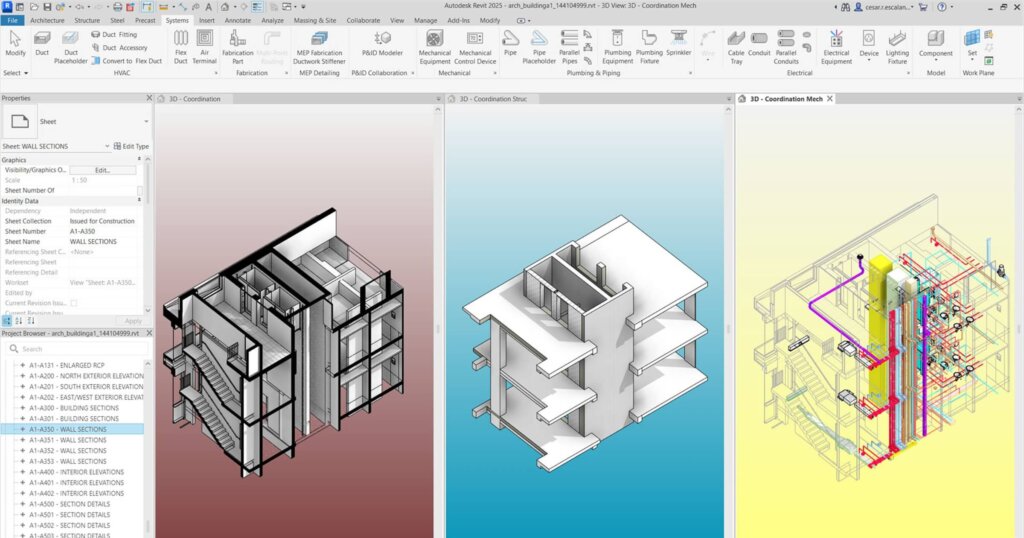
Getting started with Revit takes some prep. You need to build a project template, link different disciplines, and set up or bring in families. Once that’s done, changes update across the model automatically, which cuts down on repeated work. The interface is ribbon-based, with panels and tabs similar to those in Microsoft Office, although beginners may find it a bit crowded at first. On G2, one reviewer said: “Easy to create building models once you get to know it. I like the real-time integration between floor plans, elevations, and sections.”
Another user on SoftwareAdvice notes that while Revit “has many integrated features that make difficult tasks … seem simple,” file size and performance are drawbacks: “Sometimes files are too large and cannot be opened on computers that are not capable.”
As for mobile use, Revit doesn’t allow full model editing. Instead, professionals often rely on Revit Viewer or Autodesk’s BIM 360 mobile tools solely for viewing, markup, and issue tracking, rather than for heavy modeling work.
AutoCAD
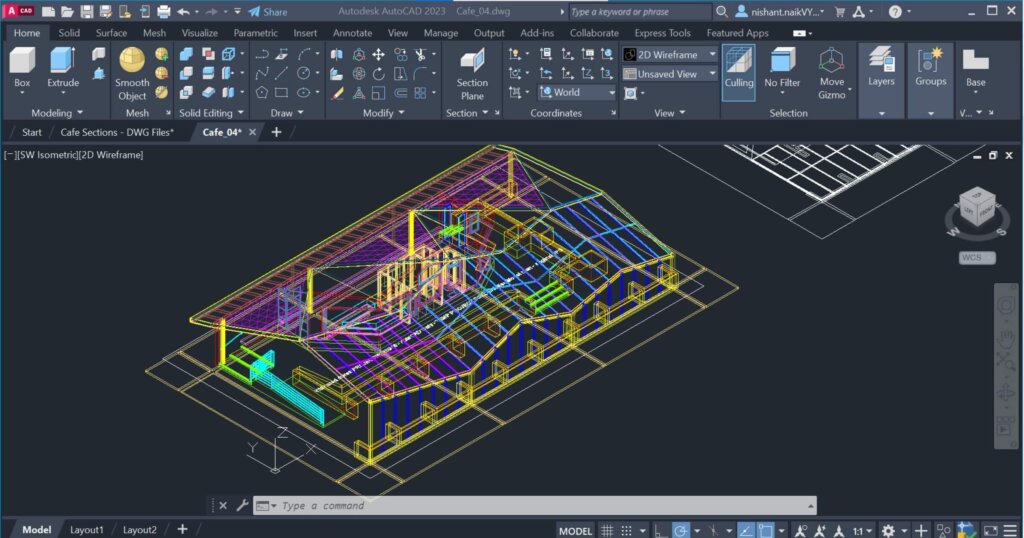
AutoCAD has a smaller learning curve. Many drafters or freelancers can open it, begin drawing, and gradually develop their skills. Because the tool has been around for decades, its command structure (command line + ribbon) is familiar to many. User feedback also supports the usability of AutoCAD.
Generally, AutoCAD excels in field edits, snapshots, and cloud sync. The mobile app is particularly useful for contractors or field teams that need to view or edit DWG files. Because these files are tied directly to the desktop version, changes sync back without requiring extra translation. Nonetheless, some advanced commands are missing or limited in functionality.
To check out the latest you’ll see the latest updates and features for AutoCAD in 2025, check out the the video below.
Takeaways
- Revit’s learning curve is steeper, and initial setup demands more time, but it pays off in consistency, model coordination, and minimizing redraws.
- AutoCAD is easier to jump into, especially for drafting or simpler projects, and its mobile app gives you real editing flexibility in the field.
- For workflows where users need to edit models on mobile, AutoCAD currently holds the advantage. Revit’s mobile tools focus on viewing and issue handling, rather than full editing.
Pros and cons of using Revit and AutoCAD
Revit
Pros:
- Great for large teams that need to work in the same model simultaneously.
- Drawings, schedules, and costs are tied together, so changes are updated everywhere.
- Helps architects, engineers, and contractors avoid clashes before they reach the jobsite.
- Useful well beyond design—it supports facility and lifecycle management.
Cons:
- Takes longer to learn and set up compared to drafting tools.
- Demands strong hardware and can feel heavy to run.
- Too much software for smaller or straightforward projects.
AutoCAD
Pros:
- Known worldwide for precise 2D drafting.
- Easier to pick up—many people learn it in school or training programs.
- A solid fit for contractors and smaller shops.
- Flexible enough to handle mechanical parts and architectural layouts.
Cons:
- Doesn’t come with built-in cost or scheduling tools.
- Collaboration gets messy when teams juggle multiple drawing files.
- Not the best choice for large or complex projects where BIM is the standard.
Final verdict: which software is right for you?
Revit is best suited for firms working on large commercial, institutional, or infrastructure projects that require multiple disciplines to coordinate. AutoCAD is still the most practical choice for smaller contractors, freelancers, and teams focused on 2D deliverables or mechanical drawings. Many firms use both, with AutoCAD for drafting and Revit for BIM coordination.
If you’re weighing CAD vs BIM in your own workflow, check out more of our guides:
To keep up with reviews, software comparisons, and construction tech updates, subscribe to our newsletter and follow us on LinkedIn.